
「下載受保護檔案」通常有兩項工作:應用程式確認使用者是否有權下載,Web Server 則負責有效率地傳送檔案。若讓 PHP 讀取並回傳每個大檔案,PHP-FPM 或 Apache 的 PHP 行程會長時間被傳輸工作占用。
X-Sendfile 將兩者拆開:PHP 完成授權後回傳 X-Sendfile HTTP 標頭;Apache 的 mod_xsendfile 收到標頭後會捨棄 PHP 的回應主體,改由 Apache 傳送指定檔案。快取條件與 Range request 等靜態檔案功能也能繼續由 Apache 處理。mod_xsendfile 專案文件 詳細說明了這個流程。
更精確地說,X-Sendfile 是把檔案交給 Apache 的輸出流程;在 Linux 上,Apache 可使用核心的 sendfile(2) 傳送檔案。目前 mod_xsendfile 會建立 APR file bucket,再交由 Apache 後續的輸出過濾器處理;sendfile(2) 是 Apache 可採用的核心傳輸最佳化,並非 mod_xsendfile 自行實作。mod_xsendfile 原始碼;Apache EnableSendfile 文件
本文以 Ubuntu/Debian、Apache 2.4 與 PHP 為例,建立可實際操作的安全下載頁面。
先理解請求怎麼走
以下範例假設 PDF、CSV 等私有檔案存放於 /srv/xsendfile-demo/downloads,且沒有對外公開的靜態 URL。
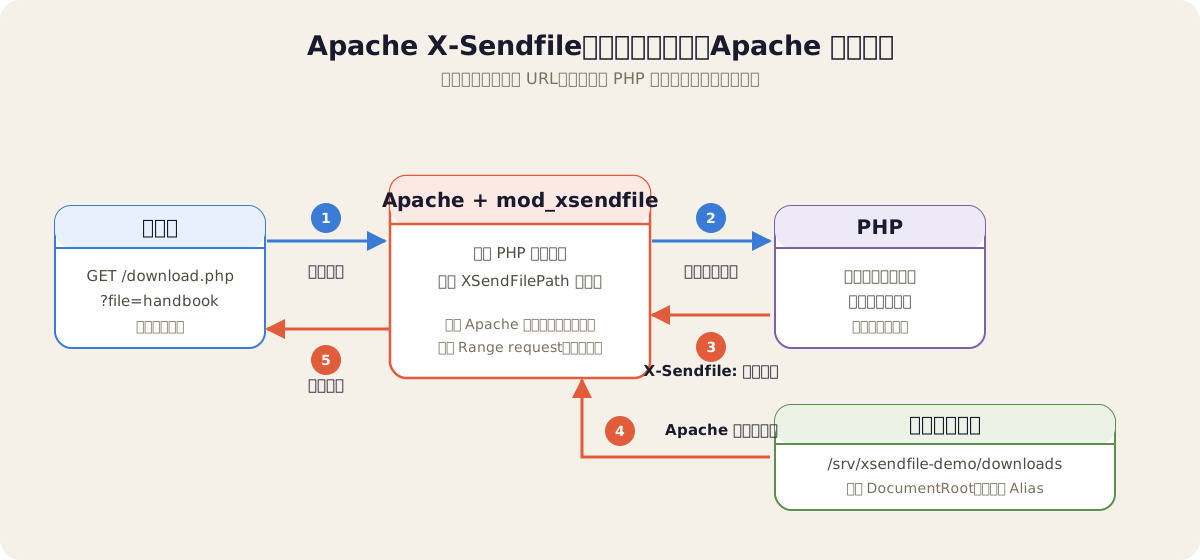
前端不應指定伺服器檔案路徑,而只傳遞檔案識別碼。PHP 依識別碼查詢資料庫或固定對照表,完成授權判斷後,才決定交由 Apache 傳送哪個檔案。
X-Sendfile是 Apache 的第三方模組mod_xsendfile所採用的慣例,並非 Apache HTTP Server 核心內建功能。Nginx 對應的機制是X-Accel-Redirect,兩者的設定與標頭值不能直接混用。
何時適合使用 X-Sendfile?
當檔案須先通過應用程式的身分驗證或商業規則,但實際傳輸不必由 PHP 逐段處理時,X-Sendfile 就很適合。常見情境包括:
- 受權限保護的下載:員工手冊、帳單、合約、醫療或客戶文件等檔案不能直接公開。PHP 先確認登入身分、租戶與檔案權限,再交由 Apache 傳送。
- 大檔案或高併發下載:影片、安裝檔、匯出的報表與備份檔若透過
readfile()由 PHP 傳送,會長時間占用 PHP worker。改由 Apache 傳送,可讓 PHP 更快釋放資源以處理下一個請求。 - 下載前需要短期授權:檔案 ID、一次性下載連結、訂閱資格、付款狀態或下載次數限制等條件都可由 PHP 判斷;判斷通過後,PHP 仍不必負責檔案串流。
- 需要 HTTP 檔案傳輸功能:若需要 Range request 續傳、瀏覽器快取條件或 Apache 的靜態檔案傳輸路徑,交由 Apache 處理通常比在 PHP 中自行實作可靠。
反之,若檔案原本就能公開,或 CDN、物件儲存服務已可直接提供下載,靜態 URL 或簽名 URL 通常更簡單。若每個位元組都必須由 PHP 即時加密、轉檔、加浮水印或動態拼接,則不適合直接將原始檔交給 X-Sendfile。
1. 安裝並啟用 mod_xsendfile
在 Debian 或 Ubuntu 安裝 Apache、PHP 與模組:
sudo apt update
sudo apt install apache2 libapache2-mod-php libapache2-mod-xsendfile
sudo a2enmod xsendfile
確認 Apache 已載入模組:
sudo apachectl -M | grep xsendfile
# xsendfile_module (shared)
接著建立專用的私有檔案目錄。範例以 Apache 的執行身分建立兩個測試檔;正式環境應由部署程序或檔案服務放入檔案:
sudo install -d -m 0750 -o www-data -g www-data /srv/xsendfile-demo/downloads
sudo -u www-data sh -c 'printf "Employee handbook\\n" > /srv/xsendfile-demo/downloads/employee-handbook.pdf'
sudo -u www-data sh -c 'printf "name,amount\\nAda,100\\n" > /srv/xsendfile-demo/downloads/monthly-report.csv'
www-data 是 Debian/Ubuntu 預設的 Apache 執行使用者;在 RHEL、Rocky Linux 等系統通常是 apache。重點是 Apache 的執行身分必須有各層目錄的穿越權限及檔案讀取權限,但此目錄不應映射為公開 URL。
2. 設定 Apache:PHP 網站與目錄白名單
先建立公開的應用程式目錄;它與私有下載目錄必須分開:
sudo install -d -m 0755 -o www-data -g www-data /var/www/xsendfile-demo/public建立 /etc/apache2/sites-available/xsendfile-demo.conf:
<VirtualHost *:80>
    ServerName downloads.example.test
    DocumentRoot /var/www/xsendfile-demo/public

    <Directory /var/www/xsendfile-demo/public>
        Options -Indexes
        AllowOverride None
        Require all granted
    </Directory>

    # 開啟 X-Sendfile,且只允許這個絕對路徑底下的檔案。
    <IfModule mod_xsendfile.c>
        XSendFile on
        XSendFilePath /srv/xsendfile-demo/downloads
    </IfModule>

    # 在 Linux 上允許 Apache 使用核心 sendfile 機制傳送檔案。
    EnableSendfile On

    ErrorLog  ${APACHE_LOG_DIR}/xsendfile-demo-error.log
    CustomLog ${APACHE_LOG_DIR}/xsendfile-demo-access.log combined
</VirtualHost>
啟用站台並檢查設定後,重新載入 Apache:
sudo a2ensite xsendfile-demo
sudo apachectl configtest
sudo systemctl reload apache2
XSendFilePath 是最重要的一行:它定義模組可傳送檔案的絕對路徑白名單。即使應用程式出現 bug 或遭到攻擊,也不應能透過 X-Sendfile 任意要求 /etc/passwd 之類的檔案;模組會拒絕白名單以外的路徑。
EnableSendfile 會影響什麼?
EnableSendfile 控制 Apache 能否使用核心的 sendfile(2) 最佳化。它通常影響傳輸效率,而非 X-Sendfile 標頭能否被處理。設為 On 且作業系統、檔案系統與輸出鏈都支援時,Apache 可減少讀檔、傳送與緩衝配置的額外操作。這常被稱為「零複製」路徑,但實際複製次數仍取決於平台與傳輸條件。大檔案較可能看出差異,實際效益仍應在目標環境量測。
設為 Off 時,X-Sendfile 仍會將檔案交給 Apache 傳送。Apache 會改走一般輸出方式,可能透過讀取緩衝區或記憶體映射處理檔案;下載仍可正常進行,只是不使用核心的 sendfile 最佳化。mod_xsendfile 是否建立檔案 bucket,以及 Apache 是否在後續輸出時呼叫 sendfile(2),也可能受模組版本與輸出過濾鏈影響。若要確認實際行為,可用 strace 觀察處理下載請求的 Apache worker:
sudo strace -f -e trace=sendfile,sendfile64,read,write -p <httpd-worker-pid>在追蹤期間發出一次下載請求,查看是否出現 sendfile 呼叫。網路掛載檔案系統(例如 NFS、SMB)可能不適合使用核心 sendfile;若遇到傳輸錯誤,可設定 EnableSendfile Off。本機檔案系統則可在確認環境支援後啟用。Apache 2.4 預設為 Off,本文示範的 On 是明確開啟這項最佳化。若前方還有 CDN 或反向代理,整體瓶頸可能位於其他環節,sendfile 的效益應以端到端量測為準。
使用 X-Sendfile 不代表可將私有目錄透過 Alias 或 <Directory> 公開。模組文件特別提醒,X-Sendfile 能傳送原本受 Apache 存取規則保護的檔案;授權責任仍在應用程式,而 XSendFilePath 應維持最小白名單。
為了精簡設定,本文使用 Apache 的
mod_php。若站台採用 PHP-FPM,程式碼不變;只要 Apache 已正確設定 PHP-FPM handler,mod_xsendfile同樣能處理 PHP 輸出的標頭。
3. 建立 PHP 示範程式
建立 /var/www/xsendfile-demo/public/index.php,作為最精簡的下載頁面:
<!doctype html>
<html lang="zh-Hant">
<meta charset="utf-8">
<title>X-Sendfile 示範</title>
<h1>X-Sendfile 示範</h1>
<ul>
  <li><a href="/download.php?file=handbook">下載員工手冊(允許)</a></li>
  <li><a href="/download.php?file=report">下載月報(示範中會被拒絕)</a></li>
</ul>
</html>
接著建立 /var/www/xsendfile-demo/public/download.php:
<?php
declare(strict_types=1);

// 私有檔案在 DocumentRoot 外,使用者輸入不可直接成為檔案路徑。
$downloadRoot = '/srv/xsendfile-demo/downloads';

// 正式專案通常由資料庫保存:檔案 ID、儲存檔名、下載檔名與權限條件。
$files = [
    'handbook' => [
        'stored_name' => 'employee-handbook.pdf',
        'download_name' => 'employee-handbook.pdf',
        'role' => 'employee',
        'content_type' => 'application/pdf',
    ],
    'report' => [
        'stored_name' => 'monthly-report.csv',
        'download_name' => 'monthly-report.csv',
        'role' => 'manager',
        'content_type' => 'text/csv; charset=utf-8',
    ],
];

function currentUserHasRole(string $requiredRole): bool
{
    // 示範用:請替換成 session、JWT 或既有的身分驗證/授權邏輯。
    return $requiredRole === 'employee';
}

$fileId = $_GET['file'] ?? '';
if (!is_string($fileId) || !isset($files[$fileId])) {
    http_response_code(404);
    exit('File not found');
}

$record = $files[$fileId];
if (!currentUserHasRole($record['role'])) {
    http_response_code(403);
    exit('Forbidden');
}

// realpath() 與目錄前綴檢查是第二道防線,防止未來資料來源含有 ../。
$root = realpath($downloadRoot);
$path = realpath($downloadRoot . DIRECTORY_SEPARATOR . $record['stored_name']);
if ($root === false || $path === false || !is_file($path)
    || !str_starts_with($path, $root . DIRECTORY_SEPARATOR)) {
    http_response_code(404);
    exit('File not found');
}

// mod_xsendfile 預設會 URL decode 標頭值,因此以 rawurlencode() 傳遞絕對路徑。
header('Content-Type: ' . $record['content_type']);
header('Content-Disposition: attachment; filename="' . $record['download_name'] . '"');
header('X-Sendfile: ' . rawurlencode($path));
exit;
將程式檔案設為可由 Apache 讀取:
sudo chown -R www-data:www-data /var/www/xsendfile-demo/public
sudo find /var/www/xsendfile-demo/public -type d -exec chmod 0755 {} \;
sudo find /var/www/xsendfile-demo/public -type f -exec chmod 0644 {} \;
現在開啟 http://downloads.example.test/,按下「下載員工手冊」。download.php 通過該檔案的存取權檢查後,輸出 Content-Type、Content-Disposition 與 X-Sendfile 標頭;接著由 Apache 傳送檔案內容。PHP 不會呼叫 readfile(),也不會將檔案載入記憶體。
4. 用 curl 驗證結果
若本機尚未設定 DNS,可先將 downloads.example.test 指向伺服器 IP,或直接使用 Host 標頭測試:
curl -i -H 'Host: downloads.example.test' \
  'http://127.0.0.1/download.php?file=handbook'
預期回應會包含下列標頭及檔案內容:
HTTP/1.1 200 OK
Content-Disposition: attachment; filename=employee-handbook.pdf
Content-Type: application/pdf
再測試權限被拒絕的檔案:
curl -i -H 'Host: downloads.example.test' \
  'http://127.0.0.1/download.php?file=report'
# HTTP/1.1 403 FORBIDDEN
也可確認 Range request 仍由 Apache 處理;這對影音播放或大檔案續傳很實用:
curl -i -H 'Host: downloads.example.test' \
  -H 'Range: bytes=0-9' \
  'http://127.0.0.1/download.php?file=handbook'
# 預期為 206 Partial Content
常見問題與除錯順序
| 現象 | 優先檢查項目 |
|---|---|
| 回應是空的或下載失敗 | apachectl -M 是否出現 xsendfile_module;XSendFile on 是否在目前 VirtualHost 生效。 |
| Apache 回傳 404/403 | XSendFilePath 是否為正確的絕對路徑;Apache 執行使用者是否具有每層目錄的執行權限與檔案讀取權限。 |
| PHP 明明輸出標頭卻沒有走 X-Sendfile | 確認 header('X-Sendfile: ...') 在任何輸出前執行,並確認 mod_xsendfile 已載入。 |
| 中文或空白檔名異常 | mod_xsendfile 預設會 URL decode 標頭值;保持預設 XSendFileUnescape on,並讓程式正確處理標頭編碼。 |
X-SENDFILE-TEMPORARY 意外刪檔 | 不要在一般下載目錄啟用 AllowFileDelete。它只適合專門存放一次性暫存檔的目錄。 |
遇到問題時,先在另一個終端機查看 Apache 的 error log:
sudo tail -f /var/log/apache2/xsendfile-demo-error.log上線前的安全清單
- 先驗證、後送出標頭:只有完成登入、租戶隔離與檔案權限判斷後,才能設定
X-Sendfile標頭。 - 使用不可猜測的檔案 ID 或資料庫主鍵:不要接受使用者提供的
file=路徑後再自行拼接。 - 同時維持兩道限制:PHP 的
realpath()路徑檢查與 Apache 的XSendFilePath白名單缺一不可。 - 不要將下載根目錄公開:它應在網站 DocumentRoot 之外,也不應有
Alias指向它。 - 以 HTTPS 提供下載:私有文件、Cookie 與登入資訊都不該以 HTTP 明文傳遞。
- 記錄稽核事件:授權成功後,記錄使用者、檔案 ID、時間與來源 IP;不要只依賴 access log 推測下載者與檔案。
小結
X-Sendfile 的價值不只是「下載變快」,而是讓 PHP 專心處理身分驗證與商業規則,讓 Apache 處理它擅長的靜態檔案傳輸。實作時,最容易被忽略的往往不是 XSendFile on,而是絕對路徑白名單、應用程式的授權判斷,以及私有檔案目錄不對外公開。做好這三件事,就能在維持存取控制的前提下,讓大檔案下載更穩定,同時減少 PHP 行程的負擔。